Teams Error - To open the web app, {{aTagStart}}
How to fix the error when logging into teams online
for the first time using Google chrome...
Error...
To open the web app, {{aTagStart}}change your browser settings{{aTagEnd}} to allow third-party cookies or {{aTagStart}}allow certain trusted domains{{aTagEnd}}.
Experience...
I have experienced this several times after creating new 365 accounts and trying to login to teams online for the first time or when I have been trying to login to another users Microsoft Teams profile to change some settings. If you are experiencing this error logging into teams online you'll notice the page seems to refresh several times over before the error appears on screen.
Solution...
After experiencing this error the last time I immediately tried to login with the same account on Microsoft Edge, the account logged in successfully. However, Chrome is my preferred browser, clearing my Chrome browser data (basic) closing Chrome and attempting to login to Teams online again fixed this issue.
Clear Chrome data to fix teams online login...
In Chrome click (top right) 3 horizontal dots → click settings

Scroll down to privacy and security → click on clear browsing data
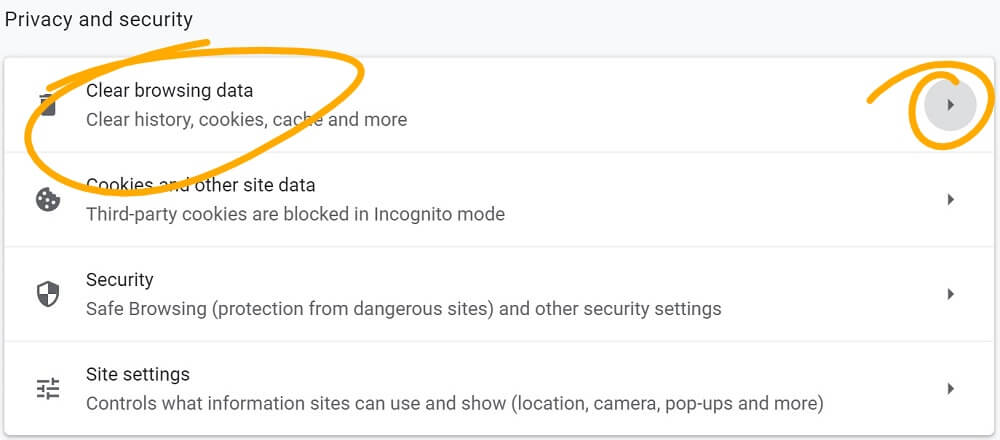
Leave settings in basic → select all time → click clear data (don't worry this won't clear your saved password)

gorazy.com open internet promise...
We believe in a free and open internet. Our users are never and will never be tracked! You will never see pointless annoying pop-ups or be asked to allow notifications. If you like the sound of an internet more like this share the message.