How to export bookmarks
Chrome | Edge | Brave
How to export and backup your bookmarks
from your favourite browser...
How to backup your bookmarks...
Just taking a backup or moving to a new PC, this is how you backup your bookmarks from your favourite browser (Chrome, Edge, Brave)...
Backup your bookmarks in Google Chrome...
From an open Chrome window select and click the 3 horizontal menu dots

From the menu select and click bookmarks → bookmarks manager

From the right hand menu select and click export bookmarks

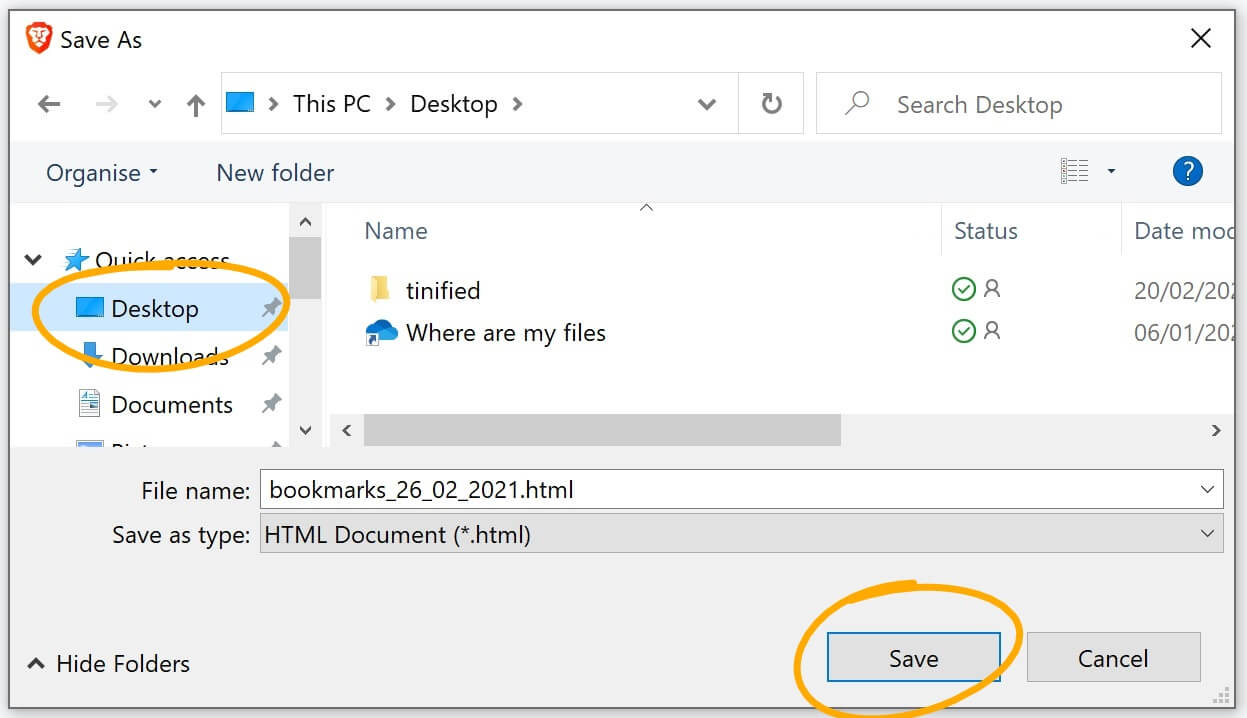
Select your save location (desktop in the example) → click save

Backup your bookmarks in Microsoft Edge...
From an open Edge window click the manage favourites icon → click the 3 horizontal dots menu → click export favourites

Select your save location (desktop in the example) → click save

Backup your bookmarks in Brave
From an open Brave window select and click the 3 vertical lines menu → click bookmarks → click bookmarks manager

Click on the 3 horizontal dots menu (top right)

Click on export bookmarks

Select your save location (desktop in the example) → click save
gorazy.com open internet promise...
We believe in a free and open internet. Our users are never and will never be tracked! You will never see pointless annoying pop-ups or be asked to allow notifications. If you like the sound of an internet more like this share the message.